How to Fix NET::ERR_CERT_COMMON_NAME_INVALID
Seeing NET::ERR_CERT_COMMON_NAME_INVALID in Chrome? Here's what this SSL certificate error means, the most common causes, and exactly how to fix it — whether you own the site or you're just trying to visit it.
You typed a web address, hit enter, and instead of the page you got a full-screen warning: Your connection is not private, with the code NET::ERR_CERT_COMMON_NAME_INVALIDunderneath. It looks alarming, but it's one of the most common — and most fixable — SSL errors on the web.
This guide covers what the error actually means, why it happens, and how to fix it — first the quick checks if you're just trying to visit a site, then the real fixes if the site is yours.
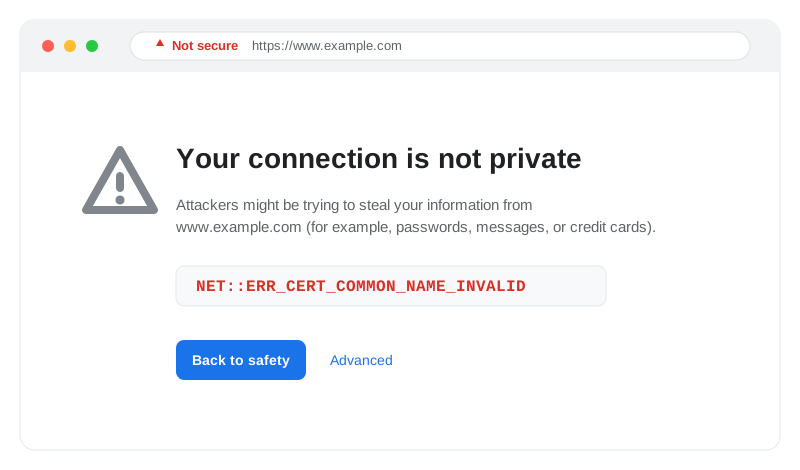
What NET::ERR_CERT_COMMON_NAME_INVALID means
Every HTTPS certificate is issued for one or more specific hostnames — like example.com and www.example.com. When your browser connects, it checks that the domain in the address bar matches a name listed on the certificate. If it doesn't match, Chrome refuses to load the page and shows NET::ERR_CERT_COMMON_NAME_INVALID.
In one sentence: the certificate is valid, but it was issued for a different domain than the one you're visiting.The "common name" (CN) — and the more important Subject Alternative Names(SAN) — on the certificate don't cover the hostname in the URL. You'll also see this called a certificate name mismatch.
Why "common name"?
The most common causes
- Missing www (or non-www). The certificate covers
example.combut notwww.example.com, or the other way around. - A subdomain that isn't on the cert. The cert covers the apex domain but you're visiting
app.example.comorblog.example.com. - The hosting provider's default certificate. A new server or shared host is still serving its generic certificate instead of one for your domain.
- Visiting by IP address. Browsing to
https://203.0.113.10will never match a cert issued for a domain name. - Wrong virtual host / SNI. The server is configured to serve the certificate for a different site on the same IP.
- A CDN or proxy misconfiguration. The edge certificate at Cloudflare, a load balancer, or a reverse proxy doesn't include the hostname being requested.
If you're just trying to visit the site
If the site isn't yours, you can't fix the certificate — but a few of these clear up a false alarm on your end:
- Check the URL for typos. Make sure you're on the real domain and not a lookalike.
- Try with and without
www. Ifexample.comfails, trywww.example.com. - Fix your device clock. A wrong date/time makes browsers reject valid certificates. Set it to update automatically.
- Open it in an incognito window. This rules out a cached certificate or a browser extension interfering.
Don't bypass it blindly
If the site is yours — the real fix
The permanent fix is almost always the same: make sure the certificate being served actually lists every hostname you use. Here's the process.
1. Confirm which names the certificate covers
First, see what the live certificate actually contains. The fastest way is our free SSL Certificate Checker — enter the domain and it lists the covered names, issuer, and expiry. Or from a terminal:
openssl s_client -connect example.com:443 -servername example.com \
  </dev/null 2>/dev/null | openssl x509 -noout -text \
  | grep -A1 "Subject Alternative Name"
Compare the listed names against the hostname showing the error. If it isn't in the list, that's your problem.
2. Reissue the certificate with every hostname
Get a certificate whose SAN list includes all the names you serve — typically both the apex and www, plus any subdomains:
- Add each hostname (e.g.
example.com,www.example.com) when requesting the certificate. - For many subdomains, use a wildcard certificate (
*.example.com) — note a wildcard covers one level, not the apex, so include the apex explicitly. - On Let's Encrypt / Certbot, list every domain:
certbot --nginx -d example.com -d www.example.com.
3. Make sure the server serves the right certificate
If the correct certificate exists but the error persists, the server is serving the wrong one for that hostname (an SNI or virtual-host issue). Check that the vhost for the failing domain points at the new certificate files, then reload the web server. If you use a CDN or proxy like Cloudflare, confirm the edge certificate also covers the hostname.
4. Redirect www and non-www consistently
Pick one canonical version and 301-redirect the other. This prevents visitors from ever hitting the uncovered variant — and it's good SEO hygiene too.
Verify the fix
How to stop it happening again
Most certificate errors don't appear the moment you make a change — they surface weeks later when a certificate silently renews without a hostname, a subdomain gets added, or an auto-renewal quietly fails. By then, it's your customers finding out, not you.
That's exactly what Uptura's SSL monitoringis for: it watches your certificates around the clock and alerts you before one expires, changes issuer, or stops covering a hostname you serve — so a name mismatch never reaches a real visitor. It's free.