How to Fix a 502 Bad Gateway Error
A 502 Bad Gateway means a gateway server (like nginx or Cloudflare) got an invalid response from the upstream server behind it. Here's what it means, how it differs from 504 and 503, and how to fix it — crashed upstreams, wrong proxy_pass, and PHP-FPM.
A 502 Bad Gateway means one server got a brokenanswer from another. Your browser reached the site's gateway — a proxy, load balancer, or CDN like nginx or Cloudflare — but when that gateway forwarded the request to the upstream server behind it, the upstream replied with something invalid, or refused the connection outright. So the gateway gives up and returns a 502.
The one-line define 502 bad gateway answer: the middle server got a bad response from the server behind it. That makes it different from a 504 (where the upstream was just too slow) — here the upstream answered, but the answer was garbage, or it wasn't there to answer at all. This guide covers what it means and exactly how to fix it, whether you're a visitor or you run the site.
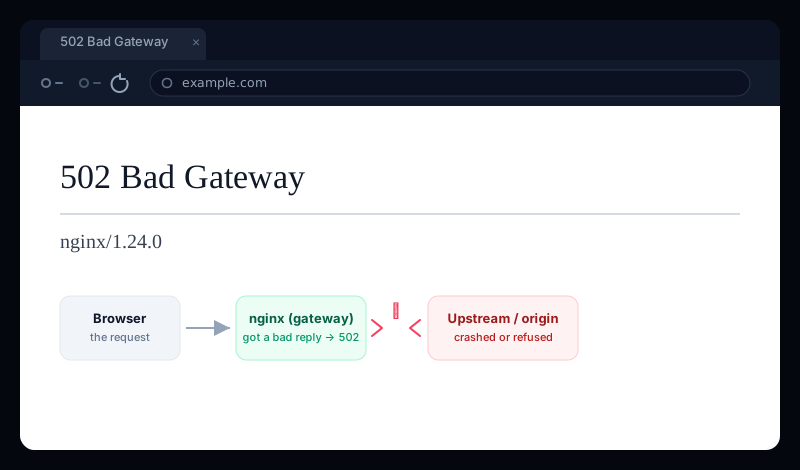
What a 502 Bad Gateway means
Most sites put a gateway in front of the server that does the real work: an nginx reverse proxy, a load balancer, or a CDN receives the request and forwards it to an upstream server (an app process, PHP-FPM, a backend API). A 502is the gateway reporting that the upstream's response was invalid— it couldn't connect, the connection was refused, the upstream crashed mid-reply, or what came back wasn't a valid HTTP response it could pass along.
In other words, the gateway is working fine — it's the thing behind it that's broken. That's why 502 bad gateway nginx (and the same error from OpenResty, which is nginx underneath) almost always points at a dead or misconfigured app server, not at nginx itself.
502 vs 504 vs 503 — which one do you have?
All three are 5xx errors from the gateway, but they mean different things about the upstream, and that difference is the fastest route to the fix:
- 502 Bad Gateway — the upstream replied with something invalid, or refused/dropped the connection. The cause is a broken or crashed upstream.
- 504 Gateway Timeout — the upstream was reachable but too slow to answer in time. The cause is slowness, not breakage. (We cover that one in depth in how to fix a 504 gateway timeout.)
- 503 Service Unavailable — the server is up but deliberately refusing right now, usually overloaded or in maintenance.
Quick read
If you're just visiting the site
A 502 is almost always the site's problem, not yours — but a few things are worth trying before you assume it's down for good:
- Reload the page. A 502 is often momentary — an app server restarting or a single crashed worker. A refresh a few seconds later frequently just works.
- Hard-refresh and clear the site's cookies (
Ctrl/Cmd + Shift + R). Occasionally a stale cached response or session is involved. - Check whether it's just you. If a quick status check shows the site returning 502 for everyone, the problem is on their end and you just have to wait for a fix.
If the site is yours — how to fix a 502
Since a 502 means the upstream gave a bad answer, the fix is almost always “get the upstream healthy again.” Work through these in order.
1. Read the nginx error log — it names the failure
The 502 line tells you how the upstream failed, which points straight at the cause:
sudo tail -n 50 /var/log/nginx/error.log

# "connect() failed (111: Connection refused) while connecting
#  to upstream"        → the upstream isn't running / wrong address
# "upstream prematurely closed connection while reading response
#  header"             → the upstream process crashed mid-request
# "no live upstreams"  → every backend in the pool is marked down
Connection refused means nothing is listening where nginx is pointing. Prematurely closed connection means the app started to answer and then died. Both are upstream problems — nginx is just the messenger.
2. Make sure the upstream is actually running
The single most common cause of 502 bad gateway nginxis that the backend simply isn't up. Confirm the app process or PHP-FPM is running and listening:
# Is PHP-FPM (or your app server) alive?
sudo systemctl status php8.3-fpm      # adjust the version
sudo systemctl restart php8.3-fpm

# Is something actually listening where nginx proxies to?
sudo ss -ltnp | grep -E ':3000|php'
If the process keeps dying, that's your real bug — check the app'sown logs (not nginx's) for the crash, and for a Node/Python/Ruby app run it under a process manager (systemd, PM2) so it restarts automatically.
3. Check the proxy_pass address matches the app
A 502 with Connection refusedoften means nginx is proxying to the wrong port or socket — the app moved and the config didn't. The address in proxy_pass (or fastcgi_pass) must exactly match where the app listens:
location / {
    proxy_pass http://127.0.0.1:3000;   # must match the app's real port
}

# For PHP, the fastcgi_pass must match the PHP-FPM socket/port:
location ~ \.php$ {
    fastcgi_pass unix:/run/php/php8.3-fpm.sock;   # must exist + be readable
}
Socket permissions bite here
fastcgi_pass points at a PHP-FPM socket, nginx must be allowed to read it. A socket owned by the wrong user, or a listen.owner/listen.group mismatch in the PHP-FPM pool, produces a 502 even though PHP-FPM is running fine. Align them to the nginx user (often www-data).4. Upstream crashing under load? Raise the worker pool
If the 502s appear only at busy times, the backend is likely running out of workers and dropping connections. For PHP-FPM, raise pm.max_children (with enough RAM to back it); for a Node or Python app, add processes/instances behind the proxy. If the app is killed by the OOM killer, that shows up as prematurely closed connection in the log.
Two more nginx-side culprits worth ruling out: an upstream sending headers bigger than nginx's buffers (raise fastcgi_buffers / proxy_buffer_size), and an SSL mismatch when proxying to an HTTPS upstream. Both surface as a 502.
5. On Cloudflare, AWS, or WordPress
- Cloudflare 502 — a
502 bad gateway cloudflaremeans Cloudflare reached your origin but got an invalid response, so the fix is at your origin, using the steps above. (A 502 rendered in Cloudflare's own branded page instead points to a problem inside Cloudflare's network — rare, and out of your hands.) - AWS 502 — an
aws 502 bad gatewayfrom an ALB usually means the target returned a malformed response or failed its health check, so the load balancer has no healthy target to route to. Check the target group health and the app logs. - WordPress 502 — a
wordpress 502 bad gatewayis nearly always PHP-FPM: a crashed pool, an exhaustedpm.max_children, or a plugin driving a worker to run out of memory. The PHP-FPM steps above are the fix.
A 502 means your site is down for real users
However it happens, a visitor who hits a 502 Bad Gateway sees a broken site — and because a crashed worker or a failed deploy can trigger it without anything looking wrong from your logged-in dashboard, it's the kind of outage you find out about far too late. Learning how to remove a 502 bad gateway after the fact helps; being told the second it starts is better.
Uptura's uptime monitoring checks your site around the clock and treats a 5xx like 502, 503, and 504 as down — confirmed across consecutive checks to avoid false alarms — so a bad gateway pages you within minutes over email or Slack, and again when it recovers. You can also spot-check any URL right now with our free website status checker to see the live status code. Uptura is free.
Chasing a related server error? Our guides on fixing a 504 gateway timeout and 403 Forbidden errors in nginx cover the slow-upstream and permission cases.