How to Fix a 504 Gateway Timeout Error
A 504 Gateway Timeout means a gateway server (like nginx or a CDN) waited too long for an upstream server and gave up. Here's what it means, how it differs from 502 and 503, and how to fix it — including nginx upstream timeouts.
A 504 Gateway Timeout means one server was waiting on another server — and gave up. Your browser reached the site's front door (a proxy, load balancer, or CDN like nginx or Cloudflare), but that front door didn't get an answer in time from the upstream server actually responsible for building the page. So it returns a 504.
The important part: a 504 is almost always a problem on the server side, not yours— and if the site is yours, it points to something slow or stuck behind your gateway. This guide covers what the error means, how it differs from a 502 and 503, and exactly how to fix it, whether you're a visitor or you run the site.
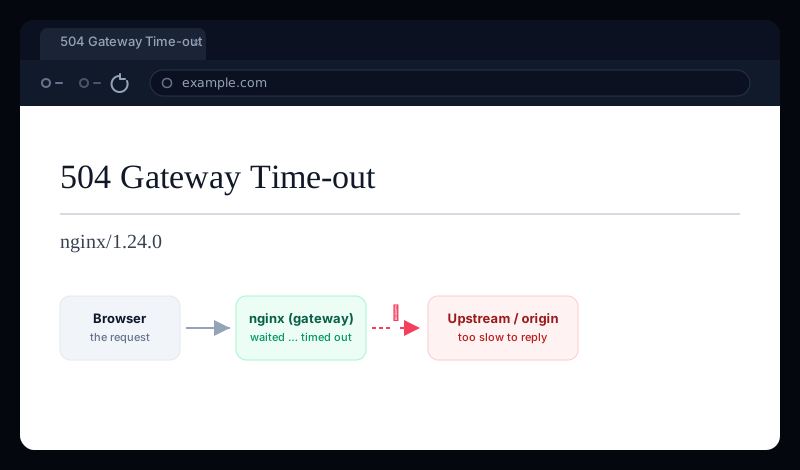
What a 504 Gateway Timeout means
Modern sites rarely run on a single machine. A request usually hits a gateway first — an nginx reverse proxy, a load balancer, or a CDN — which then forwards it to an upstream server (an app server, PHP-FPM, a backend API) that does the real work and returns a response. A 504 is the gateway saying: “I forwarded the request, but the upstream didn't answer within the time I'm allowed to wait, so I'm giving up.”
That's why the error names a gateway and a timeout: the middle server timed out waiting on the one behind it. On nginx the matching line in the error log is the tell — upstream timed out (110: Connection timed out) — and people often search for that as an upstream request timeout. The upstream request timeout meaning is exactly this: the upstream took too long, so nginx returned a 504.
504 vs 502 vs 503 — they're not the same
All three are 5xx server errors, but they fail in different ways, and knowing which you have points straight at the cause:
- 504 Gateway Timeout— the upstream was reached but didn't reply in time. The cause is slowness: a request that ran too long.
- 502 Bad Gateway — the upstream replied, but with something invalid or garbled (or the connection was refused). The cause is a broken or crashed upstream, not a slow one.
- 503 Service Unavailable— the server itself is up but deliberately refusing right now, usually because it's overloaded or in maintenance.
Quick read
If you're just visiting the site
There's not much you can do about someone else's slow server, but a few things are worth a try before you give up:
- Reload the page in a minute or two. A 504 is often caused by a temporary spike; the request that timed out might sail through once the load drops.
- Check whether it's just you. If a quick status check shows the site returning 504 for everyone, the problem is theirs and you just have to wait it out.
- Reload without the cache (
Ctrl/Cmd + Shift + R) and try a different network — on the off chance a proxy or VPN on your side is adding the delay that tips it over the timeout.
If the site is yours — how to fix a 504
A 504 on your own site is really two questions: why is the upstream slow, and is the timeout too short to tolerate it. Fix the first properly; use the second only as breathing room.
1. Read the log — it names the upstream and the timeout
Start at the nginx error log. The 504 line tells you which upstream timed out and on which phase (connect, send, or read):
sudo tail -n 50 /var/log/nginx/error.log

# The classic 504 line:
# upstream timed out (110: Connection timed out) while reading
# response header from upstream, client: ..., upstream: "fastcgi://..."
while reading response header means the upstream accepted the request but was too slow to respond — a slow app or database. If it says while connecting, the upstream is unreachable or overwhelmed before it even starts.
2. Fix the real cause: the slow upstream
This is the actual fix — a 504 is a symptom of something taking too long. The usual culprits:
- A slow database query or external API call in the request path. Profile the endpoint and add the missing index, cache the result, or move the work to a background job.
- An exhausted worker pool. If PHP-FPM (or your app server) has no free workers, requests queue until they time out. Raise
pm.max_childrenfor PHP-FPM, or add app-server processes/threads. - The upstream is down or restarting.Confirm it's actually running and listening on the address nginx proxies to.
- A genuinely long operation (a report, an export). Make it asynchronous rather than holding the HTTP request open for 60 seconds.
3. Raise the timeout — as breathing room, not a cure
If a request is legitimately slow and you can't make it faster right now, raise nginx's upstream timeouts so it waits longer before returning a 504. For a proxied upstream:
location / {
    proxy_connect_timeout   60s;
    proxy_send_timeout      60s;
    proxy_read_timeout      60s;   # the one that usually fixes a 504
}
For a PHP-FPM (FastCGI) backend it's a different directive:
location ~ \.php$ {
    fastcgi_read_timeout    60s;
}
# And in php-fpm / php.ini, make sure max_execution_time
# is at least as high, or PHP kills the script first.
Test and reload after any change: sudo nginx -t && sudo systemctl reload nginx.
A higher timeout hides the problem
proxy_read_timeoutto 300s stops the 504, but now visitors stare at a spinner for five minutes instead. Treat a raised timeout as a temporary cushion while you fix what's actually slow — not the finish line.4. On Cloudflare, a CDN, or an API gateway
If a CDN sits in front of your site, a 504 (or Cloudflare's own 524) means the CDN reached your origin but the origin was too slow to respond. The fix is the same — speed up the origin — because the CDN's edge timeout usually can't be raised far on lower plans. Move long-running work off the request path so the origin always answers quickly.
A managed API gateway timeout works the same way and is often stricter: AWS API Gateway, for example, caps integration responses at about 29 seconds, so a Lambda or backend that runs longer returns a 504 no matter what. The answer is never to chase the limit up — it's to make the endpoint return faster or hand the slow work to a queue and respond immediately.
A 504 means your site is down for real users
Whatever the cause, a visitor who hits a 504 sees a broken site — and because it's often triggered by load, it tends to strike exactly when the most people are trying to reach you. The worst way to learn your gateway is timing out is from a customer, hours after it started.
Uptura's uptime monitoring checks your site around the clock and treats a 5xx like 504, 502, and 503 as down — confirmed across consecutive checks to avoid false alarms — so a gateway timeout pages you within minutes over email or Slack, and again when it recovers. You can also spot-check any URL right now with our free website status checker to see the live status code and response time. Uptura is free.
Chasing a different server error? Our guide on fixing 403 Forbidden errors in nginx covers the permission side, and “DNS server not responding” covers the case where the site can't be reached at all.