7 Best Free Website Monitoring Tools in 2026
The 7 best free website monitoring tools of 2026 — genuinely free options for uptime, SSL, and more. What each free tier includes, the catches to watch, and which to pick.
You don't need to pay to know when your site goes down — there are plenty of genuinely good free website monitoring tool options in 2026. The catch is that “free” means different things: generous-but-personal-use-only, commercial-but-capped, or free-software-you-host. This guide compares the 7 best free website monitoring tools, what each free tier actually includes, and the fine print to watch.
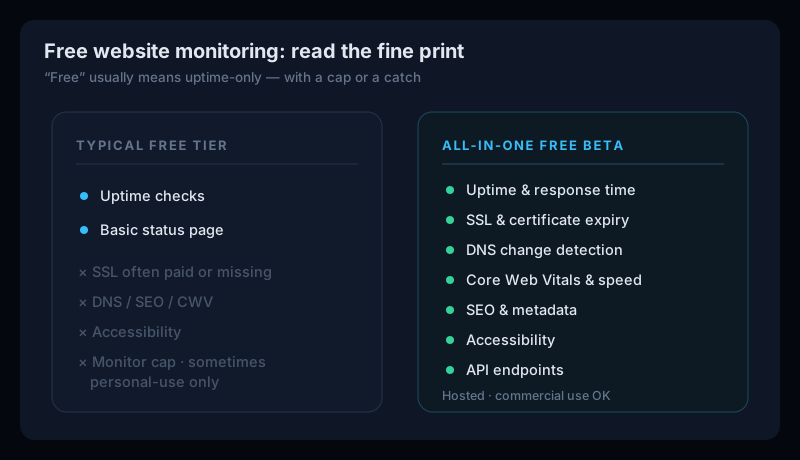
What “free” really includes
Before picking a tool, know the three flavours of free — and their trade-offs. If you're new to this, our guide to how uptime monitoring works covers the fundamentals.
- Cloud free tiers — hosted for you, but they cap monitors, slow the check interval, and often charge for SSL/DNS. Some (UptimeRobot) restrict the free plan to personal use.
- Self-hosted / open-source — unlimited and truly free software (Uptime Kuma), but you run and maintain the server, and it checks from only one location.
- Free during beta— a full product available free for now (Uptura), with every check included while it's in public beta.
The 7 best free website monitoring tools in 2026
1. Uptura — most complete free tool
Uptura is free during its public beta with every check included — not just uptime, but SSL & domain expiry, DNS, Core Web Vitals, SEO, API endpoints, and accessibility, from one hosted dashboard with email and Slack alerts and no personal-use restriction. If you want the most coverage for free without hosting anything yourself, it's the standout here.
2. UptimeRobot — most generous free uptime
UptimeRobot's free tier gives you 50 monitors at 5-minute checks plus a status page — the most generous cloud free tier for pure uptime. The catch: it's personal-use only now, and SSL monitoring is paid. See our UptimeRobot alternatives guide for the details.
3. StatusCake — best commercial-friendly free tier
StatusCake's free plan covers 10 uptime tests plus SSL, domain, and page-speed checks and a public status page — and unlike UptimeRobot, it can be used commercially. A great free all-rounder for small sites.
4. Better Stack — free uptime + incidents
Better Stack's free tier includes 10 monitors, a status page, and basic incident management — handy if you want a little more than uptime without paying.
5. Hyperping — free uptime + status page
Hyperping's free plan covers 15 monitors and a hosted status page, with a clean UI — a solid free pick if a public status page matters to you.
6. Uptime Kuma — best free self-hosted (open-source)
Uptime Kuma is the leading open-source monitor: completely free software (MIT), unlimited monitors, 20+ check types (HTTP, TCP, DNS, SSL), and 90+ notification channels. The trade-off is that you self-host it — a small VPS costs around $5/month — you maintain it, and it checks from a single location.
7. Site24x7 — free for a few sites
Site24x7's free-forever tier monitors a handful of sites with fast checks and basic SSL — a fit if you want a taste of its larger suite. See our Site24x7 alternatives guide if you outgrow it.
Free website monitoring tools compared
| Tool | Free includes | Coverage | Commercial? | Type |
|---|---|---|---|---|
| Uptura | All checks (beta) | Uptime, SSL, DNS, CWV, SEO, API, accessibility | Yes | Hosted |
| UptimeRobot | 50 monitors | Uptime, keyword, ping, port | No (personal only) | Hosted |
| StatusCake | 10 uptime + SSL + status page | Uptime, SSL, domain, page speed | Yes | Hosted |
| Better Stack | 10 monitors + status page | Uptime, incidents, status pages | Yes | Hosted |
| Hyperping | 15 monitors + status page | Uptime, status pages | Yes | Hosted |
| Uptime Kuma | Unlimited (self-host) | Uptime, SSL, DNS, TCP, +20 types | Yes | Self-hosted |
| Site24x7 | 5 sites | Uptime, SSL, basic server | Yes (limited) | Hosted |
Free tiers change often — always check each provider's current terms before relying on one.
How to choose a free tool
- Just uptime, for a personal project → UptimeRobot.
- Free for a business → StatusCake, Better Stack, or Hyperping.
- Unlimited and you'll self-host → Uptime Kuma.
- The most coverage for free, hosted → Uptura.
Free shouldn't mean uptime-only
Free Website Monitoring FAQ
What is the best free website monitoring tool?
It depends on what 'free' needs to cover. UptimeRobot has the most generous free uptime tier (50 monitors) but it's personal-use only. StatusCake is the best commercial-friendly free cloud tier (uptime, SSL, and a status page). Uptime Kuma is the best free option if you're happy to self-host. And Uptura is the most complete free tool — every check, not just uptime — while it's in public beta.
Are free website monitoring tools actually free?
Mostly yes, but watch the catches. Cloud free tiers cap the number of monitors and often slow the check interval (5 minutes vs 1). SSL and DNS monitoring are frequently paid add-ons. UptimeRobot's free plan is restricted to personal use. And 'free' open-source tools like Uptime Kuma are free software but you pay to host them (a small VPS runs around $5/month) and maintain them yourself.
Can I use a free monitoring tool for my business?
Check the license. UptimeRobot's free plan is personal, non-commercial use only — businesses need a paid plan. StatusCake, Better Stack, Hyperping, Uptime Kuma (self-hosted), and Uptura all allow commercial use on their free offerings.
What should a free tool monitor besides uptime?
Ideally SSL certificate expiry and DNS, since both can take a site down while uptime looks fine. Most free tiers are uptime-only or charge for SSL; a few (StatusCake, Uptura) include it. Uptura's free beta goes further, adding Core Web Vitals, SEO, and accessibility too.
The most complete free monitoring, hosted
Uptura gives you every check for free during our public beta — uptime, SSL and domain expiry, DNS, Core Web Vitals, SEO, API endpoints, and accessibility — from one hosted dashboard, with email and Slack alerts confirmed across checks to avoid false alarms, and no personal-use restriction. No server to run, no monitor games. Create a free account and set up your first monitor in a couple of minutes.