What Is Uptime Monitoring? The Complete Guide for 2026
What is uptime monitoring, how does it work, and how do you choose uptime monitoring software? A practical guide — check types, what uptime % really means, and what to look for.
Uptime monitoringis the practice of automatically checking that your website, server, or API is online and responding — on a schedule — and alerting you the moment it isn't. It's the difference between hearing “your site is down” from your monitoring tool in two minutes, or from an angry customer two hours later. This guide explains what uptime monitoring is, how it works, what uptime percentages really mean, and what to look for in uptime monitoring software.
What is uptime monitoring?
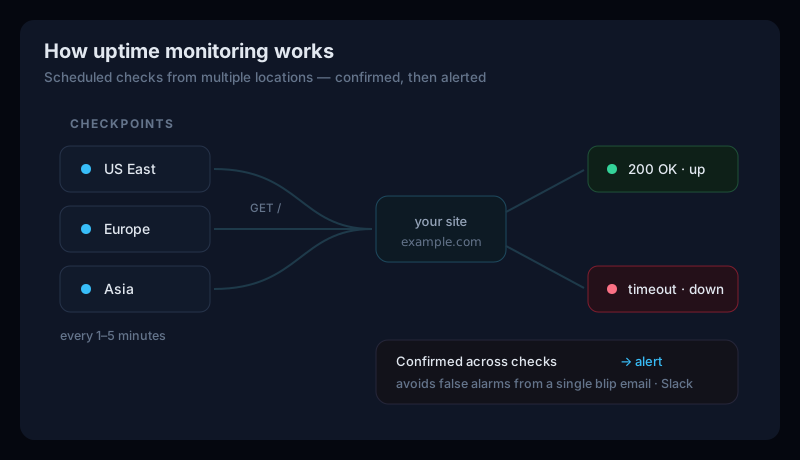
At its simplest, uptime monitoring is an automated watchman for your site. A monitoring service requests your URL at a fixed interval and records whether it responded correctly. Over time that produces an uptime percentage— the share of checks that succeeded — and, crucially, a real-time alert whenever a check fails. You don't have to be watching; the monitor is.
How does uptime monitoring work?
Every uptime monitor follows the same loop:
- Scheduled checks.The service sends a request (usually an HTTP GET) to your URL every 1–5 minutes. More frequent checks mean a smaller window before you're alerted.
- From one or more locations. Checking from several regions rules out a problem that only affects one network path, and confirms the outage is real for everyone.
- Success or failure. A success status (like 200 OK) within the timeout marks the site up. A timeout, connection error, or error status marks it down.
- Confirmation, then alert.A good monitor re-checks a failure before alerting, so a single network blip doesn't page you at 3 a.m. Once confirmed, it sends an alert by email, Slack, or SMS — and another when the site recovers.
You can try a one-off version of this right now with our free website status checker — it does a single check and shows the status code, response time, and redirect chain.
Why uptime monitoring matters
- Downtime costs money.For an ecommerce store or SaaS, every minute offline is lost sales and churned trials — and you can't fix an outage you don't know about.
- It protects trust. Customers who hit a dead site remember it. Catching outages fast keeps them short.
- It affects SEO.If Google's crawler repeatedly finds your site down, it can affect crawling and rankings over time.
- It proves your SLA. If you promise customers a certain uptime, monitoring is how you measure and evidence it.
What uptime percentage actually means
Uptime is usually quoted as a percentage — but the difference between 99% and 99.9% is much bigger than it looks. Here's roughly how much downtime each level allows (approximate, based on a 30-day month and 365-day year):
| Uptime | Downtime / month | Downtime / year |
|---|---|---|
| 99% (two nines) | ~7.2 hours | ~3.65 days |
| 99.9% (three nines) | ~43 minutes | ~8.8 hours |
| 99.99% (four nines) | ~4.3 minutes | ~53 minutes |
| 99.999% (five nines) | ~26 seconds | ~5.3 minutes |
99.9% (“three nines”) is the common baseline for business sites. Pushing to four or five nines gets expensive fast, so the right target is whatever matches the real cost of a minute offline for your business.
What to look for in uptime monitoring software
Most uptime monitoring software checks whether a site is up — the differences are in how fast, how reliably, and how much else they watch:
- Check frequency — 1-minute checks catch outages faster than 5-minute ones (and are often paywalled on free plans).
- Confirmation logic — does it re-check before alerting? This is the difference between useful alerts and alert fatigue.
- Alert channels — email, Slack, and SMS, ideally without every integration locked behind a higher tier.
- Status pages— a public page that shows customers you're aware of an issue.
- Breadth— the best tools pair uptime with SSL, DNS, performance, and SEO so you're not stitching together five subscriptions.
If you're comparing specific tools, we have detailed guides to the best UptimeRobot alternatives, Pingdom alternatives, Better Uptime alternatives, and Site24x7 alternatives.
Uptime monitoring is only half the picture
Here's the catch most people miss: a site can be up and still be broken. It can return a perfect 200 OK while its SSL certificate is days from expiring, its DNS was quietly changed, a redirect loop is losing customers, or its Core Web Vitals are dragging down its Google ranking. Uptime-only monitoring shows green the whole time.
“Up” is not the same as “working”
Uptime Monitoring FAQ
What is uptime monitoring?
Uptime monitoring is the practice of automatically checking that a website, server, or API is online and responding, on a regular schedule, and alerting you the moment it isn't. Instead of finding out your site is down when a customer complains, a monitoring service checks it every few minutes from one or more locations and notifies you within minutes of an outage.
How does uptime monitoring work?
A monitoring service sends a request to your URL on a fixed interval — typically every 1 to 5 minutes — from one or more global locations. If the site responds with a success status (like 200 OK) in time, it's marked up. If it times out or returns an error, a good monitor re-checks to confirm the failure is real (not a single network blip) and then sends an alert by email, Slack, or SMS.
What is a good uptime percentage?
99.9% uptime — often called 'three nines' — is the common baseline for business websites, allowing about 43 minutes of downtime per month. 99.99% ('four nines') is roughly 4 minutes a month and is typical for critical services. The right target depends on how much a minute of downtime actually costs you.
Is uptime monitoring enough on its own?
Not quite. Uptime monitoring tells you when a site is fully down, but a site can return a perfect 200 OK while its SSL certificate is expiring, its DNS was changed, or its performance is tanking rankings. The most useful setups pair uptime monitoring with SSL, DNS, performance, and SEO checks so you catch the problems that happen while the site is still technically 'up'.
Start monitoring your uptime free
Uptura's uptime monitoringruns scheduled checks around the clock, confirms a failure across checks before alerting to avoid false alarms, and notifies you by email and Slack the moment a site goes down — and again when it recovers. And because “up” isn't the same as “working,” it watches SSL, DNS, Core Web Vitals, SEO, API endpoints, and accessibility from the same dashboard. It's free during our public beta, no credit card required. Create a free account and set up your first monitor in a couple of minutes.