How to Fix a 400 Bad Request Error
A 400 Bad Request error means your request was malformed — a bad URL, corrupted cookies, or oversized headers. Here's what it means and how to fix it.
A 400 Bad Requestmeans the server couldn't understand your request because something in it was malformed — a mangled URL, corrupted cookies, oversized headers, or invalid syntax. Like a 401, 403, or 404, an error 400 is a client error(a 4xx): nothing on the server crashed, it just can't make sense of what you sent. This guide covers what it means, what causes it, and how to fix a 400 bad request error — as a visitor or as the site owner.
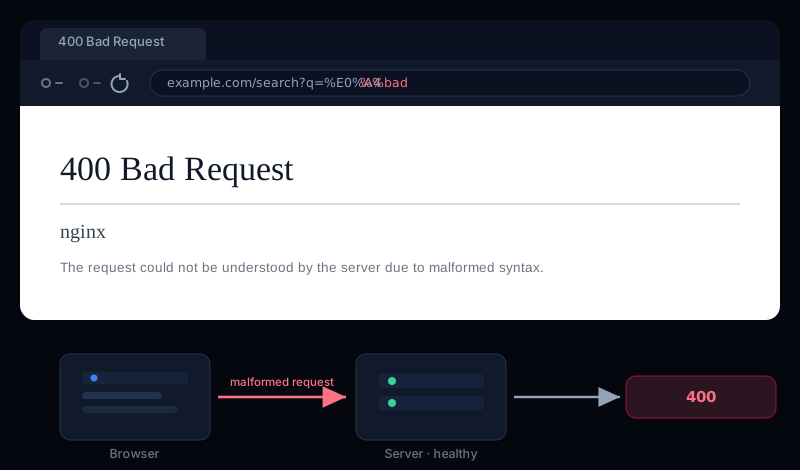
What Is a 400 Error (400 Bad Request Meaning)
A 400 Bad Request is the HTTP status code a server returns when it receives your request but can't process it because the request is malformed — a bad URL, corrupted cookies, oversized headers, or invalid syntax. It's a client-side error, so the fix is almost always in the request, not the server.
You'll see it written as HTTP status 400 Bad Requestor simply error 400. Because it's a 4xx, the server is telling you it heard you fine — the request itself just didn't make sense.
What Causes Error Code 400
Most of the time, an error 400 comes down to one of a handful of causes:
- A malformed or badly encoded URL — an illegal character or a broken percent-encoding (
%not followed by valid hex). (A URL that's merely too long is usually a414 URI Too Long, not a 400.) - Corrupted or oversized cookies — the single most common cause for everyday visitors. Old, malformed, or too-large cookies get sent with every request and the server rejects the lot.
- Request headers that are too large— too many or too-big headers (often auth tokens piling up) exceed the server's buffer, and nginx or Apache returns a 400.
- Invalid request syntax or body — for APIs, malformed JSON, a missing
Content-Type, or a body that doesn't match what the endpoint expects.
Related codes worth knowing
413, a URL that's too long is 414, and headers that are too large can be 431. Some setups still collapse these into a plain 400.Error 400 on Google, OAuth & YouTube
A lot of the “error 400” searches aren't about your web server at all — they're Google-side. If you hit Error 400: redirect_uri_mismatch or Error 400: invalid_requestsetting up Google or OAuth sign-in, it's a configuration problem: the redirect URI in your request doesn't exactly match one registered in the Google Cloud console (scheme, domain, path, and trailing slash all count). Fix the registered URI to match. A plain Error 400 (Bad Request)on YouTube or Gmail is almost always the browser side — clear that site's cookies and cache and it clears.
If you're just visiting the site
When you hit a 400 bad request on someone else's site, the problem is almost always something your browser is sending — so the fixes are quick:
- Check the URL. Retype it by hand and look for typos or stray characters. A single bad character is enough to trigger a 400.
- Clear that site's cookies and cache. This fixes the majority of 400s for visitors — corrupted or oversized cookies are the usual culprit. Clear cookies for the specific domain, then reload.
- Try an incognito window or another browser.If it works there, a cookie or extension in your normal browser was the cause — clear cookies and you're set.
- Turn off a VPN or proxy.These can bloat your headers past the server's limit. Disabling it (or clearing cookies) often clears the 400.
Quick fix
If the site or API is yours — how to fix a 400
When your own server or API returns a 400, decide whether clients are sending genuinely invalid requests or your server's limits are too tight.
Oversized headers or cookies
If large auth tokens or many cookies trip the limit, nginx returns a 400 (“Request Header Or Cookie Too Large”). Raise the header buffers — carefully — or trim what you're sending. On Apache, the equivalent knob is LimitRequestFieldSize:
# nginx — allow larger request headers (big cookies / JWTs)
large_client_header_buffers 4 16k;

# Apache — raise the per-header size limit (bytes)
LimitRequestFieldSize 16384
“The plain HTTP request was sent to HTTPS port”
A very common server-side 400 is nginx's The plain HTTP request was sent to HTTPS port. It means a client, health check, or misconfigured proxy spoke plain HTTP to a port that only accepts HTTPS. Fix the client to use https://, or catch nginx's internal 497 and redirect it:
# nginx — redirect an HTTP-on-HTTPS-port request instead of returning 400
error_page 497 https://$host$request_uri;
Malformed requests from your own client code
If your frontend or a service is generating the request, fix it at the source: URL-encode query values, send a valid Content-Type, and make sure JSON bodies are well-formed. For an API, return a helpful 400 that says what was wrong (which field, why) instead of a bare 400 Bad Request — it turns a dead end into a fixable error.
Don't answer a bad request with a 200 or 500
400, not a 200 “it worked” or a 500 “we crashed.” A precise 400 tells the client the problem is theirs to fix, and keeps your logs honest about what's a server fault versus a bad request.400 vs 401 vs 403 vs 404
All four are 4xx client errors, but they mean different things — and knowing which you have points straight at the fix:
- 400 Bad Request — the request was malformed; the server couldn't parse it.
- 401 Unauthorized — the request was fine, but you need to authenticate.
- 403 Forbidden— understood and authenticated, but you're not allowed. (See how to fix 403 Forbidden in nginx.)
- 404 Not Found— the request was fine, the resource just doesn't exist.
And if the request is valid but you're being rate-limited, that's a 429 Too Many Requests, not a 400.
400 Bad Request FAQ
What does a 400 Bad Request mean?
It means the server received your request but couldn't process it because the request was malformed — a bad URL, corrupted cookies, oversized headers, or invalid syntax. It's a client error, so the problem is in the request, not the server.
Is a 400 error my fault?
Usually the request is at fault rather than you personally. On someone else's site it's almost always your browser sending stale cookies or a bad URL — clearing that site's cookies fixes most of them. On your own site, it's a malformed request from a client, a proxy, or a header limit set too low.
Can a VPN cause a 400 Bad Request?
It can. A VPN or proxy can add or rewrite headers and cookies, and if the combined headers grow too large the server rejects the request with a 400. Turn the VPN off, or clear the site's cookies, and try again.
What's the difference between a 400 and a 422?
A 400 Bad Request means the request was malformed and couldn't be parsed at all. A 422 Unprocessable Entity means the syntax was fine but the data failed validation — the server understood it, it just wasn't acceptable.
Catch 400s before your users do
A stray 400 on your own site — a broken link generating bad URLs, a proxy mangling headers, or an API rejecting valid traffic after a deploy — quietly turns visitors away, and it rarely shows up until someone complains.
Uptura's uptime monitoring watches your pages and API endpoints around the clock and flags unexpected status codes like 400, 500, or a site going down — confirmed across consecutive checks to avoid false alarms — so a broken request path pages you within minutes over email or Slack, and again when it recovers. You can also spot-check any URL right now with our free website status checker to see the live status code and headers. Uptura is free during our public beta.
Chasing a different error? Our guides on fixing a 403 Forbidden and a 429 Too Many Requests cover the not-allowed and rate-limited cases.