How to Fix a 429 Too Many Requests Error
A 429 Too Many Requests error means you've sent too many requests too quickly and hit a rate limit. Here's what it means, how the Retry-After header works, and how to fix it — whether you're calling an API or you run the server.
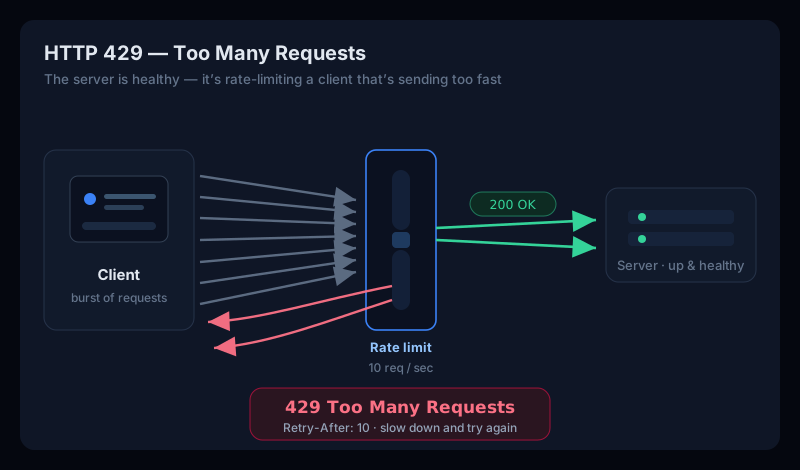
A 429 Too Many Requestserror means exactly what it says: you've sent too many requests in too short a time, and the server has hit its rate limit and is turning you away. Unlike a 5xx error, nothing is broken — this is a client error(a 4xx), a healthy server deliberately saying “slow down.”
So the short answer to what an HTTP 429 means: the request was fine, but you've exceeded the number of requests you're allowed in a window of time, so the server refused this one to protect itself. This guide explains what the 429 too many requests error means, how the Retry-Afterheader tells you when to try again, and how to fix it — whether you hit it in a browser, you're calling an API, or the server is yours.
What “429 Too Many Requests” means
Every word of the 429 Too Many Requestsstatus is literal. The server received and understood your request; it's just that you (or your IP, your API key, or your session) have made more requests than a rate limit allows within a set period — say, 100 requests per minute. The server responds with the HTTP 429 status code instead of doing the work, so it stays fast and fair for everyone else. Among the HTTP status codes, 429 is the one dedicated to rate limiting — in other words, 429 is the rate limit HTTP code.
So what does too many requests mean — and what does 429 too many requests mean exactly? The 429 too many requests meaningin one line: you've been rate-limited — you sent more requests than you're allowed, so the server refused this one and wants you to slow down. You'll sometimes see the same thing worded as 429 rate limit requests exceeded.
A well-behaved 429 tells you when you can try again with a Retry-After header — a number of seconds, or a date. Many APIs also send X-RateLimit-Limit, X-RateLimit-Remaining, and X-RateLimit-Reset headers so you know how much of your quota is left before you trip the 429 error.
429 vs 503 — being throttled vs being overloaded
A 429 is often confused with a 503 Service Unavailable— some people even search for a “429/500 error” lumping them together — because both can involve limits, but they say very different things:
- 429 Too Many Requests — a client error. The server is healthy and is specifically telling youthat you've exceeded your quota. Back off and you're fine.
- 503 Service Unavailable — a servererror. The server as a whole is overloaded or in maintenance and can't serve anyone right now.
Quick read
Retry-After telling you when to come back.If you hit 429 in a browser
Seeing too many requests while just browsing usually means something is firing requests on your behalf faster than the site allows. A few things to try:
- Stop and wait, then reload once. Rapidly hammering refresh makes a 429 worse. Wait the number of seconds in the
Retry-Afterheader (or just a minute) and try again a single time. - Disable a misbehaving extension. A browser extension or auto-refresh tab stuck in a loop can blow past a rate limit on its own. Try the site in a private window with extensions off.
- Check if you share an IP. On office, campus, or VPN networks, many people share one public IP — so the limit can be hit by someone else. Switching off the VPN or onto another network often clears it.
If you're calling an API — back off properly
For developers, an error 429 too many requests is the API doing its job. The fix is to make your client respect the limit rather than fight it:
- Honour
Retry-After. Don't retry immediately on a 429 — read the header and wait exactly that long before the next call. - Use exponential backoff with jitter. If there's no
Retry-After, wait 1s, then 2s, then 4s (plus a little randomness), instead of retrying in a tight loop that keeps you permanently limited. - Watch the rate-limit headers. Slow down before you hit zero: when
X-RateLimit-Remaininggets low, pace your calls untilX-RateLimit-Reset. - Batch, cache, and de-duplicate. Cache responses you keep re-fetching, combine calls where the API supports it, and drop duplicate requests — the cheapest way past a
rate limit exceededis to make fewer requests.
# Pseudocode: respect Retry-After, else exponential backoff
for attempt in range(0, 5):
    res = call_api()
    if res.status != 429:
        break
    wait = res.headers.get("Retry-After") or (2 ** attempt)
    sleep(float(wait))
A tight retry loop makes 429 permanent
If the server is yours — tuning 429
If your own site is returning a 429 error, decide first whether the limit is doing its job (blocking abuse or a runaway client) or is simply too tight for real traffic.
Returning a proper 429 in nginx
This trips up a lot of people: nginx's limit_req and limit_conn return a 503 by default, not a 429. If you want a rate-limited client to get a correct 429 too many requests nginx response, set the status explicitly and add a Retry-After:
# nginx: rate-limit and return a real 429 (not the default 503)
limit_req_zone $binary_remote_addr zone=api:10m rate=10r/s;

server {
    location /api/ {
        limit_req zone=api burst=20 nodelay;
        limit_req_status 429;                 # 429, not 503
        add_header Retry-After 10 always;     # try again in ~10s
    }
}
Is the limit too strict?
If legitimate users are hitting too many requests during normal use, the limit — or its burst allowance — is too low. Raise it to fit real traffic patterns, or key the limit on an API token instead of a shared IP so one busy office network doesn't exhaust everyone's quota. If it's abuse or a misbehaving bot, the 429 is working — leave it.
A 429 can mean real users are being turned away
A rate limit that's catching bots is healthy. But a 429 Too Many Requeststhat starts hitting genuine visitors — a limit set too tight, or a client stuck retrying — means people can't use your site, and it tends to flare up under exactly the traffic you most want to serve.
Uptura's uptime monitoring checks your site and API endpoints around the clock and can flag unexpected status codes like 429 — confirmed across consecutive checks to avoid false alarms — so a rate-limit problem pages you within minutes over email or Slack, and again when it recovers. You can also spot-check any URL right now with our free website status checker to see the live status code and headers. Uptura is free.
Chasing a related error? Our guides on fixing a 503 service unavailable and a 502 bad gateway cover the overloaded-server and broken-upstream cases.