How to Fix ERR_SSL_PROTOCOL_ERROR
ERR_SSL_PROTOCOL_ERROR means your browser couldn't establish a secure connection. Here's what it means and how to fix it — as a visitor or a site owner.
ERR_SSL_PROTOCOL_ERROR means your browser tried to open a secure HTTPS connection and the SSL/TLS handshake failed — the two sides couldn't agree on how to encrypt the connection, so the browser stopped before loading anything. It's a deliberately generic SSL error: the cause can sit on your device, your network, or the server. This guide explains what err_ssl_protocol_errormeans and how to fix it — whether you're a visitor or you run the site.
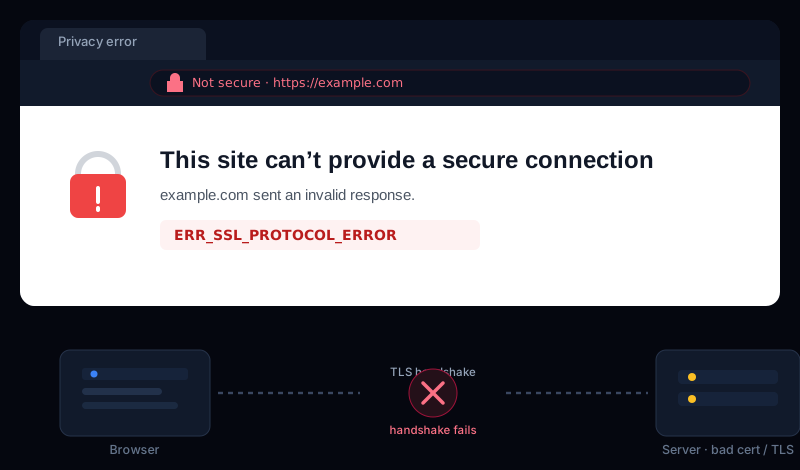
What ERR_SSL_PROTOCOL_ERROR means (ssl error meaning)
Every HTTPS page starts with an SSL/TLS handshake: your browser and the server exchange the certificate, agree on a TLS version, and pick a cipher to encrypt everything that follows. The ssl error meaning behind ERR_SSL_PROTOCOL_ERRORis simply that this handshake broke — one side couldn't validate or negotiate the secure connection, so it refused to continue in the clear.
So what is err_ssl_protocol_error telling you? Not much on its own — which is why fixing it is a process of elimination. The quickest tell is whereit happens: on one device or network, it's almost always local; on every device and browser, it's the server.
If you're just visiting the site
When you hit an err_ssl_protocol_erroron someone else's site, the right err_ssl_protocol_error fix starts with the local causes — they solve the large majority of cases:
- Check your device's date and time. The most common local cause. Certificates are only valid for a date range, so a wrong clock makes every certificate look invalid. Set the date/time to update automatically and reload.
- Clear your browsing data / SSL state. A stale cached certificate can keep failing. Clear cached files and cookies (on Windows you can also clear the SSL state in Internet Options), then retry.
- Disable antivirus “HTTPS scanning.”Security suites like Avast, ESET, and Kaspersky intercept HTTPS to inspect it, and a broken interception throws this exact error. Turn off the “HTTPS scanning” / “SSL scanning” feature and test again.
- Try incognito with extensions off. A misbehaving extension or a VPN/proxy can break the handshake. A private window (which disables extensions) isolates it quickly.
- Update or switch browsers. If you see
err_ssl_protocol_error on all browsersand on other devices too, stop here — it's not you, it's the server.
Quick triage
If the site is yours — how to fix it
A server-side ERR_SSL_PROTOCOL_ERROR means the handshake is failing for everyone, and it comes down to the certificate or the protocol:
- An invalid or expired certificate — expired, self-signed, or missing the intermediate chain. Check it first with our free SSL certificate checker, which shows the expiry, issuer, and whether the chain is complete.
- An outdated TLS version — modern browsers refuse TLS 1.0 and 1.1. If your server only offers those, the handshake fails. Enable TLS 1.2 and 1.3.
- No shared cipher— if the server's cipher suites don't overlap with what the browser accepts, there's nothing to negotiate. Update the server's TLS config to a modern cipher list.
- HTTP served on the HTTPS port — a misconfigured vhost answering plain HTTP on port 443 breaks the handshake (this is the Firefox
ssl_error_rx_record_too_longcase below).
Related SSL errors you might see
The same broken handshake shows up under different names depending on the browser or CDN. Here are the ones you'll run into most:
Cloudflare Error 525 — SSL handshake failed
A ssl handshake failed error code 525 means Cloudflare couldn't complete the TLS handshake with your originserver. Usually the origin's certificate is missing, expired, or doesn't cover the domain, or the origin doesn't support the TLS version Cloudflare is using. Install a valid certificate on the origin (a free one works) and set Cloudflare's SSL mode to Full.
Cloudflare Error 526 — invalid SSL certificate
An invalid ssl certificate error code 526 appears when Cloudflare is in Full (strict)mode but the origin's certificate can't be validated — it's expired, self-signed, or the wrong hostname. Fix the origin certificate, or (less securely) drop to Full mode while you do.
Firefox: ssl_error_rx_record_too_long
Firefox's ssl_error_rx_record_too_long almost always means the server is speaking plain HTTP on the HTTPS port — a vhost listening on 443 without SSL configured, or a proxy pointed at the wrong port. The browser expects an encrypted record and gets an HTML page instead. Fix the port/SSL configuration on the server.
ssl_error_no_cypher_overlap
ssl_error_no_cypher_overlapis the “no shared cipher” case stated plainly: the browser and server have no cipher suite in common, usually because the server's TLS config is too old. Modernize the cipher list and enable TLS 1.2/1.3.
ERR_SSL_PROTOCOL_ERROR FAQ
What does ERR_SSL_PROTOCOL_ERROR mean?
It means your browser tried to open a secure (HTTPS) connection to a site but the SSL/TLS handshake failed, so it couldn't agree on how to encrypt the connection. The error is generic on purpose — it can come from your device, your network, or the server's certificate and configuration.
How do I fix ERR_SSL_PROTOCOL_ERROR in Chrome?
Start with your device's date and time (a wrong clock breaks certificate validation), then clear your browsing data / SSL state, try an incognito window with extensions off, and temporarily disable any antivirus "HTTPS scanning" feature. If it still fails everywhere, the problem is on the server side.
Is ERR_SSL_PROTOCOL_ERROR my fault or the website's?
Either. If it only happens to you — on one device or network — it's usually local: a wrong clock, a security app intercepting HTTPS, or a stale SSL cache. If it happens on every device and browser, the site's certificate or TLS configuration is the cause and only the owner can fix it.
Why does ERR_SSL_PROTOCOL_ERROR happen on all browsers?
When it appears in every browser (and on other devices), the handshake is failing at the server, not in your browser — an expired or misconfigured certificate, an outdated TLS version, or no cipher the client and server both support. That's a site-owner fix, and an SSL check will pin down which one.
Catch an SSL problem before your visitors do
A certificate that expires, an origin that drops to an old TLS version after a deploy, a chain that breaks when an intermediate changes — any of these turns into an ERR_SSL_PROTOCOL_ERRORfor every visitor, and it rarely surfaces until someone can't reach your site.
Uptura's SSL monitoring watches your certificate around the clock — expiry, issuer, chain, and TLS version — and alerts you over email or Slack before it expires and the moment the handshake starts failing, confirmed across checks to avoid false alarms. You can also run a one-off check right now with our free SSL certificate checker. Uptura is free during our public beta.
Seeing a different certificate error? Our guides on NET::ERR_CERT_COMMON_NAME_INVALID and “unable to get local issuer certificate” cover the name-mismatch and broken-chain cases.