How to Make Your Website ADA Compliant: 7 Steps + Checklist (2026)
What ADA website compliance means, who it applies to, the 2026 Title II deadlines, and seven practical steps to make your website ADA compliant — plus the most common fixes.
If you're wondering how to make your website ADA compliant, you're not alone: web accessibility lawsuits are filed in the US every day, and new rules for government websites now have real deadlines. The good news is that ADA compliance comes down to a well-defined standard and a repeatable process. This guide covers what ADA website compliance actually means, who it applies to, and a step-by-step plan to make your site accessible — and keep it that way.
Not legal advice
What is ADA website compliance?
The Americans with Disabilities Act (ADA) is a 1990 US civil rights law that prohibits discrimination against people with disabilities. It was written before most businesses had websites, but the Department of Justice has long said it applies to websites too.
An ADA compliant websiteis one people with disabilities can use: someone who is blind can navigate it with a screen reader, someone who can't use a mouse can operate it with a keyboard, and someone with low vision can read the text. Because the ADA itself doesn't spell out technical rules for most websites, the measuring stick is the WCAG guidelines — specifically WCAG 2.1 or 2.2 Level AA.
Does your website have to be ADA compliant?
- State and local governments (Title II).Yes, explicitly. The DOJ's April 2024 rule requires WCAG 2.1 AA for websites and mobile apps. Entities serving 50,000 people or more had until 24 April 2026; smaller entities and special districts have until 26 April 2027.
- Businesses open to the public (Title III). There's no technical regulation yet, but courts in many jurisdictions have ruled that websites of businesses like stores, restaurants, hotels, and service providers must be accessible. Thousands of web accessibility lawsuits are filed each year, many against small and mid-sized businesses.
- Federal agencies and contractors. These fall under Section 508, which uses WCAG 2.0 AA.
Selling to Europe too? The European Accessibility Act has applied since June 2025 and also maps to WCAG 2.1 AA — so the same work covers both.
How to make your website ADA compliant: 7 steps
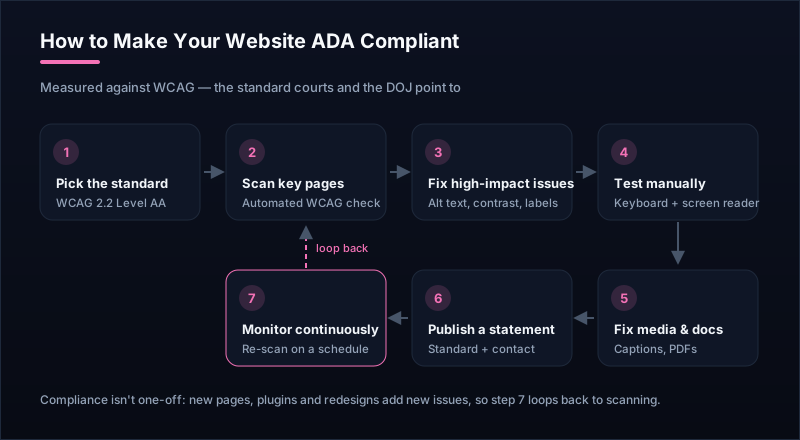
- Pick your standard: WCAG 2.2 Level AA. It includes everything in WCAG 2.1 AA (what the DOJ rule names) plus a few newer criteria, so it covers you either way.
- Scan your key pages. Run your homepage, main landing pages, product or service pages, contact form, and checkout through the free accessibility checker. It lists each failing WCAG rule, its severity, and the exact element to fix.
- Fix the high-impact issues first. The most common failures are also among the quickest to fix: missing alt text, low color contrast, form fields without labels, empty links and buttons, and a missing page language. (Details in the next section.)
- Test with a keyboard and a screen reader. Tab through every page: can you reach every link, menu, and form control, and see where you are? Then listen with NVDA (free on Windows) or VoiceOver (Mac and iPhone). Automated tools can't judge these experiences for you.
- Fix media and documents. Add captions to videos, transcripts to audio, and make sure important PDFs are accessible — or publish the same content as a regular web page.
- Publish an accessibility statement.Say which standard you follow, what you've done, any known issues, and how people can contact you if something doesn't work. It shows good faith and gives users a way to reach you before they reach a lawyer.
- Monitor it continuously. Every new page, plugin, or redesign can introduce new issues. Re-scan on a schedule so problems are caught soon after they ship, not in a demand letter months later.
The most common ADA website issues (and how to fix them)
1. Images without alt text
Screen readers read an image's alt text aloud. Give every meaningful image a short, specific description (“Red running shoe, side view”, not “image1.jpg”), and give purely decorative images an empty alt attribute so they're skipped.
2. Low color contrast
Light gray text on white is the classic failure. Body text needs at least 4.5:1 contrast against its background, and large text 3:1. Check your brand colors in the color contrast checker — it suggests the closest passing shade if a pair fails.
3. Form fields without labels
Placeholder text isn't a label: it disappears when you type and often isn't read out. Give every input a visible label connected to it in the code, and describe errors in text, not just with a red border.
4. Empty links and buttons
Icon-only buttons — a magnifying glass, a cart, a hamburger menu — are announced as just “button” unless they have an accessible name. Add visually hidden text or an aria-label like “Search” or “Open menu”.
5. Keyboard traps and invisible focus
Menus, modals, and sliders built from generic elements often can't be reached or closed with the keyboard. Use real buttons and links, make sure modals can be closed with Escape, and never remove the focus outline without replacing it.
6. Missing structure
Use one H1 per page and real heading levels in order, mark up lists as lists, and set the page language. Screen reader users navigate by headings the way sighted users skim.
What about accessibility overlays and widgets?
Overlay products promise one-line ADA compliance. They can't deliver it: an overlay can't reliably add the right label to an unlabeled field or make a broken custom menu keyboard-accessible, and many disabled users find them get in the way. Businesses using overlays have still been sued. Fix the underlying site instead — the issues above are usually smaller jobs than they sound.
ADA compliant website checklist
- Every meaningful image has descriptive alt text.
- Text meets 4.5:1 contrast (3:1 for large text and UI components).
- Every form field has a visible, connected label; errors are described in text.
- All links and buttons have a clear accessible name.
- The whole site works with a keyboard, and focus is always visible.
- Headings are in a logical order, and the page language is set.
- Videos have captions; audio has transcripts.
- Text can be zoomed to 200% and the layout works on a phone.
- An accessibility statement with contact details is published.
- Pages are re-scanned on a schedule to catch new issues.
Running a full review? The step-by-step accessibility audit checklist covers every check in order.
ADA website compliance FAQ
What is ADA website compliance?
ADA website compliance means your website can be used by people with disabilities, in line with the Americans with Disabilities Act. The ADA doesn't list technical rules for most private websites, so in practice compliance is measured against the Web Content Accessibility Guidelines (WCAG) — usually WCAG 2.1 or 2.2 Level AA.
Does my website have to be ADA compliant?
If you're a US state or local government, yes — the DOJ's 2024 rule requires WCAG 2.1 AA, with deadlines in April 2026 and April 2027 depending on size. If you're a business open to the public (Title III), courts in many US jurisdictions have held that websites must be accessible, and thousands of lawsuits are filed every year. Treat accessibility as a requirement, and ask a lawyer about your specific situation.
How do I know if my website is ADA compliant?
Start with an automated scan, such as Uptura's free accessibility checker, to find machine-detectable WCAG failures like missing alt text, low contrast, and unlabeled form fields. Then test manually with a keyboard and a screen reader. No tool can certify full compliance on its own, but these two steps show you where you stand.
What is the ADA website compliance deadline?
For state and local governments under Title II, the DOJ rule sets 24 April 2026 for entities serving 50,000 people or more, and 26 April 2027 for smaller entities and special districts. There's no fixed deadline for private businesses under Title III — the risk of a complaint or lawsuit applies now.
Do accessibility overlays or widgets make a website ADA compliant?
No. Overlay widgets that add a toolbar or try to fix pages automatically can't repair problems in your underlying code, such as missing labels or broken keyboard access, and sites using them have still been sued. Fixing the site itself is the only reliable path.
How much does it cost to make a website ADA compliant?
It depends on the size of the site and how it was built. Many of the most common fixes — alt text, color contrast, form labels, heading structure — are quick changes a developer or content editor can make. Larger costs usually come from custom components, PDFs, and video captions. Free tools help you find and prioritize issues before you spend money on an audit.
Check your site now — and keep it compliant
Run your homepage through the free accessibility checker to see your WCAG issues in seconds. Then let Uptura's accessibility monitoringre-audit your key pages on a schedule and alert you when a new violation appears, so a new page or plugin doesn't quietly undo your work. It's free to start — create an account in a couple of minutes.