WCAG Guidelines Explained: Levels, Principles & 2.2 Checklist (2026)
What the WCAG guidelines are, how A, AA, and AAA levels work, the four POUR principles, what's new in WCAG 2.2, and a practical WCAG 2.2 AA checklist to test your site.
The WCAG guidelines are the rulebook for web accessibility. Almost every accessibility law, procurement contract, and lawsuit points back to them — so if you build or run websites, knowing what WCAG asks for is no longer optional. This guide explains what WCAG is, how the guidelines are organized, what Level A, AA, and AAA mean, what changed in WCAG 2.2, and a practical WCAG AA checklist you can work through today.
What is WCAG?
WCAG stands for Web Content Accessibility Guidelines. It's a technical standard published by the W3C's Web Accessibility Initiative that defines how to make web content usable for people with disabilities — including people who are blind or have low vision, are deaf or hard of hearing, have limited movement, or have cognitive and learning disabilities.
The simplest WCAG definition: a set of testable rules that, when met, mean a person using a screen reader, a keyboard, voice control, or a magnifier can use your site as well as anyone else. Because the rules are testable, WCAG is what lawyers, auditors, and accessibility tools measure a site against.
WCAG versions: 2.0, 2.1, 2.2, and 3.0
- WCAG 2.0 (2008) — the foundation. Still referenced by older laws, including the US Section 508 refresh.
- WCAG 2.1 (2018) — added criteria for mobile, low vision, and cognitive accessibility, such as reflow and non-text contrast. WCAG 2.1 AA is the level most current laws name.
- WCAG 2.2 (October 2023) — the current version. It added nine success criteria, mostly about focus visibility, target size, and easier logins, and removed one obsolete criterion (4.1.1 Parsing).
- WCAG 3.0— a draft with a very different scoring model. It isn't a finished standard, so you can't be tested against it yet.
Each version builds on the last
The four principles of WCAG (POUR)
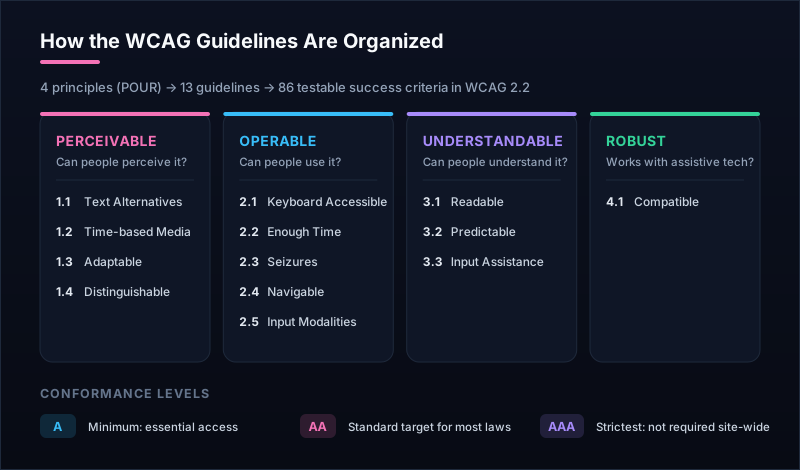
Every WCAG guideline sits under one of four principles, often remembered as POUR: perceivable, operable, understandable, and robust. Under them are 13 guidelines, and under those are the success criteria you actually test.
1. Perceivable
People must be able to perceive the content — it can't be invisible to all of their senses.
- 1.1 Text Alternatives — alt text for images and other non-text content.
- 1.2 Time-based Media — captions, transcripts, and audio description for video and audio.
- 1.3 Adaptable — real headings, lists, labels, and reading order in the code.
- 1.4 Distinguishable — color contrast, resizable text, and content that reflows on small screens.
2. Operable
People must be able to use every control and navigate the page, whatever device they use.
- 2.1 Keyboard Accessible — everything works with a keyboard alone, with no keyboard traps.
- 2.2 Enough Time — users can pause, stop, or extend time limits and moving content.
- 2.3 Seizures and Physical Reactions — nothing flashes more than three times a second.
- 2.4 Navigable — page titles, skip links, a logical focus order, and a visible focus indicator.
- 2.5 Input Modalities — touch targets big enough to hit, and alternatives to dragging and complex gestures.
3. Understandable
People must be able to understand the content and how the interface works.
- 3.1 Readable — the page language is set, so screen readers pronounce it correctly.
- 3.2 Predictable — consistent navigation, and nothing changes unexpectedly on focus or input.
- 3.3 Input Assistance — form labels, clear error messages, and help to avoid and fix mistakes.
4. Robust
Content must work reliably with browsers and assistive technologies, now and as they change.
- 4.1 Compatible — every control exposes its name, role, and state to assistive technology.
WCAG levels: A, AA, and AAA
Each success criterion has a conformance level:
- Level A— the basics. Without these, some people can't use the page at all (for example, images with no text alternative, or controls that don't work with a keyboard).
- Level AA— the standard target. It includes all of Level A plus criteria like 4.5:1 text contrast, visible focus, and text that resizes. When a law or contract says “WCAG compliant,” it almost always means AA.
- Level AAA — the highest level, with stricter rules like 7:1 contrast and sign-language interpretation for video. Useful where you can, but not expected across a whole site.
WCAG 2.2 AA checklist: the criteria that matter most
WCAG 2.2 has 86 success criteria, but a small set causes most real-world failures. Start with these — they cover the issues that block the most people and show up most in audits and lawsuits.
| Criterion | Level | What to check |
|---|---|---|
| 1.1.1 | A | Every meaningful image has descriptive alt text; decorative images have empty alt. |
| 1.2.2 | A | Pre-recorded videos have accurate captions. |
| 1.3.1 | A | Headings, lists, tables, and form labels are real HTML elements, not just styled text. |
| 1.4.3 | AA | Text has at least 4.5:1 contrast (3:1 for large text). |
| 1.4.4 | AA | Text can be zoomed to 200% without content being cut off. |
| 1.4.10 | AA | Content reflows at 320px wide without horizontal scrolling. |
| 1.4.11 | AA | Buttons, inputs, icons, and focus rings have 3:1 contrast. |
| 2.1.1 | A | Every link, button, menu, and form works with the keyboard alone. |
| 2.4.2 | A | Each page has a unique, descriptive title. |
| 2.4.4 | A | Link text makes sense in context — no bare “click here”. |
| 2.4.7 | AA | Keyboard focus is always visible. |
| 2.5.8 | AA | Touch targets are at least 24 × 24 CSS pixels (new in 2.2). |
| 3.1.1 | A | The page language is set in the html lang attribute. |
| 3.3.1 | A | Form errors are identified and described in text. |
| 3.3.2 | A | Form fields have visible labels or instructions. |
| 4.1.2 | A | Custom controls expose their name, role, and state (ARIA used correctly). |
Want the full audit process, not just the criteria? Our accessibility audit checklist walks through testing a site step by step.
What's new in WCAG 2.2
WCAG 2.2 added nine success criteria. Six of them are at Level A or AA:
- 2.4.11 Focus Not Obscured (Minimum) (AA) — the focused element isn't completely hidden by sticky headers, cookie banners, or chat widgets.
- 2.4.12 Focus Not Obscured (Enhanced) (AAA) — no part of the focused element is hidden.
- 2.4.13 Focus Appearance (AAA) — the focus indicator is large and high-contrast enough to see.
- 2.5.7 Dragging Movements (AA) — anything you can drag can also be done with a single click or tap.
- 2.5.8 Target Size (Minimum) (AA) — click and tap targets are at least 24 × 24 CSS pixels, or spaced apart.
- 3.2.6 Consistent Help (A) — help options like a contact link appear in the same place on every page.
- 3.3.7 Redundant Entry (A) — users aren't asked to re-type information they already gave in the same process.
- 3.3.8 Accessible Authentication (Minimum) (AA) — logging in doesn't depend on a memory or puzzle test, and password managers and paste work.
- 3.3.9 Accessible Authentication (Enhanced) (AAA) — a stricter version of 3.3.8 with no object or image recognition tests.
It also removed 4.1.1 Parsing, because modern browsers and assistive technologies no longer break on the minor HTML errors it was written to catch.
Is WCAG a legal requirement?
WCAG itself isn't a law, but many laws adopt it as the technical standard:
- United States (ADA)— the Department of Justice's 2024 rule requires state and local government websites to meet WCAG 2.1 AA, and courts routinely use WCAG to judge private businesses under the ADA. See our guide on how to make your website ADA compliant.
- US federal (Section 508) — incorporates WCAG 2.0 AA for federal agencies and their vendors.
- European Union — the European Accessibility Act has applied since June 2025, and its harmonised standard, EN 301 549, maps to WCAG 2.1 AA.
- Canada and the UK— Ontario's AODA and UK public-sector rules also point to WCAG AA.
Not legal advice
How to test your site against WCAG
Testing combines automated tools with manual checks:
- Run an automated scan. Our free website accessibility checker runs axe-core against any page and lists every failing WCAG rule with the exact element to fix.
- Check your colors. Test text and background pairs with the color contrast checker against the 4.5:1 and 3:1 thresholds.
- Use a keyboard. Unplug the mouse and tab through the page: can you reach and use everything, and can you always see where focus is?
- Try a screen reader. NVDA (free on Windows) or VoiceOver (built into Mac and iPhone) will quickly show missing labels and confusing structure.
Automated tools reliably catch around a third to half of WCAG issues — the machine-checkable ones — so the manual checks matter. Automation's real strength is repetition: it can re-test every page on a schedule, so a new release can't quietly undo your work.
WCAG FAQ
What are the WCAG guidelines?
WCAG (Web Content Accessibility Guidelines) are the international standard for making websites and apps usable by people with disabilities. Published by the W3C, they're organized into four principles — perceivable, operable, understandable, and robust — then 13 guidelines and, in WCAG 2.2, 86 testable success criteria at levels A, AA, and AAA.
What does WCAG stand for?
WCAG stands for Web Content Accessibility Guidelines. They're developed by the World Wide Web Consortium's Web Accessibility Initiative (W3C WAI), the same organization that maintains HTML and CSS standards.
What is the latest version of WCAG?
WCAG 2.2 is the current version, published as a W3C Recommendation on 5 October 2023. It's backwards compatible: a site that meets WCAG 2.2 also meets 2.1 and 2.0. WCAG 3.0 is in development as a draft and is not yet a standard you can be tested against.
What is WCAG 2.1 Level AA?
WCAG 2.1 Level AA means a site meets every Level A and Level AA success criterion in WCAG 2.1. It's the level most laws and contracts point to, including the US Department of Justice's 2024 rule for state and local government websites and the European standard EN 301 549.
What is the difference between Section 508 and WCAG?
WCAG is the technical standard; Section 508 is a US law that requires federal agencies to make their technology accessible. Since the 2017 refresh, Section 508 incorporates WCAG 2.0 Level AA by reference — so meeting WCAG 2.1 or 2.2 AA also covers the 508 web requirements.
Do I need to meet WCAG Level AAA?
Usually not. The W3C itself says AAA isn't recommended as a requirement for entire sites, because some AAA criteria can't be met for all content. Aim for AA everywhere, and adopt AAA criteria — like 7:1 text contrast — where they're practical.
Keep your site WCAG compliant
Meeting WCAG once is the easy part; staying compliant as content and code change is the hard part. Uptura's accessibility monitoring audits your pages against WCAG 2.2 on a schedule and alerts you when a new violation appears — alongside uptime, SSL, and performance monitoring in one dashboard. It's free to start. Create a free account, or run a one-off scan with the free accessibility checker first.