SaaS Uptime Monitoring: Protect Your SLA & Your Customers (2026)
SaaS uptime monitoring protects your SLA, revenue, and customer trust. What to monitor beyond the homepage, SLA uptime targets explained, and how to catch outages first.
For a SaaS business, uptime isn't just a nice-to-have — it's usually a contractual promise, and the reliability your product is sold on. SaaS uptime monitoringis how you keep that promise: continuously checking that your app, API, and login are responding, and alerting you the moment they're not. This guide covers why uptime is existential for SaaS, what SLA targets actually mean, and what you need to monitor beyond the homepage.
What is SaaS uptime monitoring?
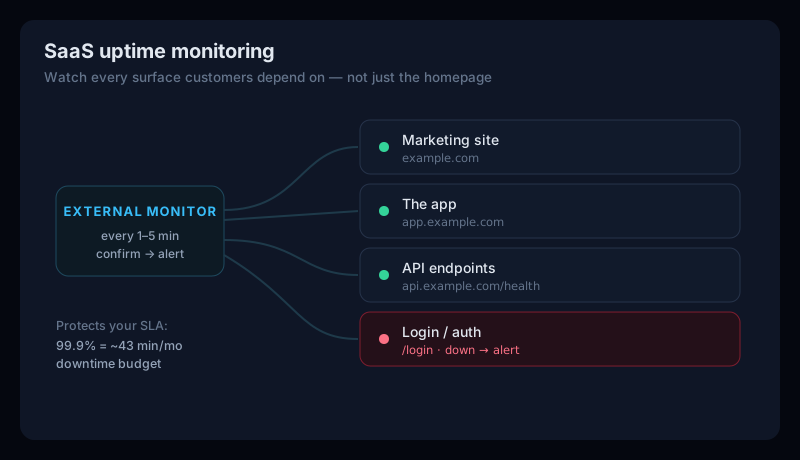
SaaS uptime monitoringis uptime monitoring applied to the realities of a software product: instead of watching a single marketing page, you watch every surface a customer depends on — the app, the API, and the login flow — on a schedule, with alerts when any of them fails. If you're new to the basics, start with our complete guide to uptime monitoring; this article focuses on what's different for SaaS.
Why uptime is existential for SaaS
- It breaches your SLA.Most SaaS contracts promise a specific uptime. Miss it and you may owe service credits or refunds — and you can only report uptime honestly if you're measuring it.
- It drives churn.A product that's down when a customer needs it is a product they start looking to replace. Trials that hit an outage often never convert.
- It damages trust. Reliability is a core part of what SaaS sells. A visible outage — especially a repeated one — undermines the whole pitch.
- You can't fix what you can't see. The worst outcome is a customer telling you that you're down. Continuous monitoring means you know first.
SLA uptime targets, explained
SaaS SLAs are quoted as an uptime percentage — and each extra nine is a big jump in engineering effort. Here's the downtime each level allows (approximate, 30-day month / 365-day year). Think of it as your error budget: the downtime you can spend before you're in breach.
| SLA uptime | Downtime budget / month | Downtime / year |
|---|---|---|
| 99.9% (three nines) | ~43 minutes | ~8.8 hours |
| 99.95% | ~22 minutes | ~4.4 hours |
| 99.99% (four nines) | ~4.3 minutes | ~53 minutes |
99.9% is the common baseline. Committing to 99.99% means almost no room for error — roughly four minutes of downtime a month — which takes real engineering investment, so match the target to what your customers actually need.
What to monitor in a SaaS product
Monitoring only your homepage gives false confidence — it can be up while the parts customers use are down. Cover the full surface:
- The app. The actual product URL (app.yourdomain.com), not just the marketing site.
- API endpoints. Monitor a health-check endpoint and your business-critical routes for status code, latency, and valid responses. See API monitoring for this specifically.
- Login / auth.If customers can't log in, you're down for them — even if everything else responds.
- SSL & DNS. An expired certificate or a bad DNS change takes the whole product offline. Watch both — check yours now with our free SSL checker.
External monitoring & status pages
Internal metrics (dashboards, logs) tell you why something broke, but they can go down with the system. External monitoring — checking from outside your infrastructure — is what reliably tells you that it broke, the way a customer experiences it.
Confirm before you alert
A public status page then turns a bad moment into a trust-building one: customers who can see you're aware of an issue and working on it are far more forgiving than those left guessing.
SaaS Uptime Monitoring FAQ
What is SaaS uptime monitoring?
SaaS uptime monitoring is the continuous, automated checking that a software-as-a-service product — its app, API, and login — is online and responding, with instant alerts when it isn't. For SaaS, uptime is usually a contractual promise (an SLA), so monitoring is how you detect outages fast, protect that SLA, and keep customer trust.
What uptime should a SaaS product target?
Most SaaS SLAs target 99.9% ('three nines'), which allows about 43 minutes of downtime per month. More demanding products commit to 99.95% (~22 minutes) or 99.99% (~4 minutes). The right target is a business decision: higher uptime costs more to engineer, so you match it to what customers need and what your SLA credits would cost.
What should a SaaS company monitor besides the homepage?
The parts customers actually use: the application itself (app.yourdomain.com), your public API endpoints (ideally a health check), and the login/auth flow — because a product whose marketing site is up but whose login is down is still 'down' for every customer. Monitoring only the homepage gives you false confidence.
Why does uptime monitoring matter so much for SaaS?
Because downtime hits SaaS harder than most businesses: it breaches SLAs (often triggering credits or refunds), drives churn and failed trials, and damages the reliability reputation a SaaS sells on. And you can't fix — or honestly report — an outage you didn't detect, which is why external, continuous monitoring is table stakes.
Monitor your SaaS free
Upturamonitors every surface of your SaaS from outside — app, API endpoints, and login — on a schedule, confirms failures across checks before alerting to avoid false pages, and notifies you by email and Slack. And because “up” isn't the same as “working,” it also watches SSL, DNS, Core Web Vitals, SEO, and accessibility from one dashboard — so you protect both your SLA and the experience behind it. It's free during our public beta, no credit card required. Create a free account and set up your first monitor in a couple of minutes.