How to Fix the "Too Many Redirects" Error
A "too many redirects" error means a URL is stuck in a redirect loop. Here's what causes it — http/https, www, Cloudflare — and how to fix it.
A too many redirects error means a URL is stuck in a redirect loop: one address redirects to a second, the second redirects back to the first, and your browser bounces between them until it gives up. Chrome shows it as ERR_TOO_MANY_REDIRECTS; other browsers just show a blank wall. This guide explains what the too many redirects errormeans, what causes it, and how to fix it — whether you're a visitor or you run the site.
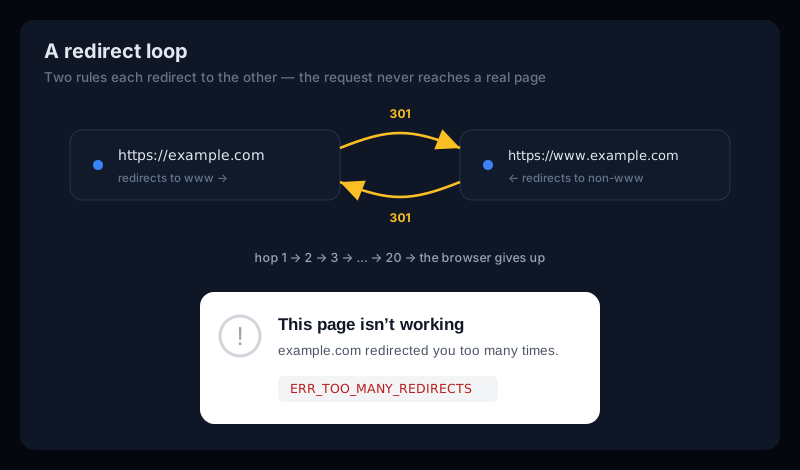
What “Too Many Redirects” means
So what does too many redirects mean in practice? Every time your browser follows a redirect, it counts. When the redirects never resolve to a real page — because two of them point at each other — the count climbs until the browser caps out (usually around 20 hops) and stops to protect you from an infinite loop.
That's all a redirect loop is: what is a redirect loop comes down to two rules that each think they get the last word. A sends you to B, B sends you straight back to A, and neither ever serves the actual page. Redirect loops are especially confusing because nothing looks broken — the server responds to every request, it just responds with another redirect.
What causes a redirect loop
Almost every ERR_TOO_MANY_REDIRECTS traces back to two redirect rules fighting each other. The usual suspects:
- HTTP ↔ HTTPS fighting — a rule forcing HTTPS while something else forces HTTP, so each keeps handing the request back to the other.
- www vs non-www mismatch — the bare domain redirects to
wwwandwwwredirects back to the bare domain. Pick one canonical version; don't let both redirect. - Cloudflare “Flexible” SSL — the single most common cause. Cloudflare talks to your origin over HTTP, the origin redirects to HTTPS, Cloudflare sends it back over HTTP, and they loop forever.
- A stale or bad cookie — a login/session cookie that never satisfies the check sends the visitor back to the login page on every request. This is the one visitors can fix themselves.
- A WordPress URL mismatch— the Site Address and WordPress Address settings (or a redirect plugin) disagreeing with the server's own http/https/www rules.
If you're just visiting the site
When you hit a too many redirectserror on someone else's site, the cause is sometimes on your end — a stale cookie — so try these first:
- Clear that site's cookies. The top visitor-side fix. A corrupted or stale login cookie is the classic cause of a loop that only affects you. Clear cookies for the specific domain, then reload.
- Try incognito / a private window. It starts with no cookies — if the page loads there, a cookie in your normal browser was the cause, so clear it.
- On Safari, clear the site data. A
safari too many redirectsloop usually clears with Settings → Safari → Advanced → Website Data → remove the site (or Develop → Empty Caches). Safari caches redirects aggressively, so this matters more than on Chrome. - Otherwise, it's the site. If it loops in incognito too, the misconfiguration is on the server and only the owner can fix it — nothing on your end will help.
If the site is yours — how to fix it
The fix is always the same shape: find the two rules that disagree, and make them agree on one canonical URL.
- See the loop first. Run the URL through our free redirect checker— it follows every hop and shows you the exact pair of URLs bouncing back and forth, so you're fixing the real loop instead of guessing.
- Pick one canonical version. Decide on HTTPS + either
wwwor non-www, and make sure only one redirect enforces it. Two rules each redirecting to the other is the loop. - Fix Cloudflare SSL. If you use Cloudflare, set the SSL/TLS mode to
FullorFull (strict), neverFlexible, when your origin already serves HTTPS. - Check WordPress URLs.Confirm the Site Address and WordPress Address (Settings → General) both use the same https/www form, and disable any redirect plugin temporarily to see if it's the culprit.
The one-rule rule
301 vs 302 — and how the wrong one causes trouble
Redirect loops and redirect SEO problems both come down to the code on each hop, and the whole http 301 vs 302 question is one word: permanence. A 301 is a permanent redirect — the page moved for good, and Google passes its ranking signals to the new URL. A 302 is a temporary redirect — the page is elsewhere for now, and Google keeps crediting the original address.
Leave a 302 on a move that was actually permanent and you strand your rankings on the old URL (a classic 302 redirect SEO mistake). And when two redirects of any kind point at each other, you get the loop above. The redirect checker shows the code on every hop, so you can confirm a moved page returns a 301 — not an accidental 302 — and that the chain actually ends somewhere.
Too Many Redirects FAQ
What does "too many redirects" mean?
It means the URL is stuck in a redirect loop: one address redirects to a second, which redirects back to the first, and the browser bounces between them until it gives up. The server is responding every time — it's just responding with "go somewhere else" forever.
How do I fix "too many redirects" as a visitor?
Clear that site's cookies (the most common cause of a login-style loop), then reload — or open the page in a private/incognito window. If it still loops there, the problem is on the site's end and only the owner can fix it.
Why does Cloudflare cause a redirect loop?
The usual culprit is Cloudflare's SSL mode set to "Flexible" while your origin server also forces HTTPS. Cloudflare talks to the origin over HTTP, the origin redirects to HTTPS, Cloudflare sends it back over HTTP, and the two loop. Setting the SSL mode to "Full" (or "Full (strict)") fixes it.
What's the difference between a 301 and a 302 redirect?
A 301 is a permanent redirect — the page has moved for good, and search engines pass its ranking signals to the new URL. A 302 is a temporary redirect — the page is elsewhere for now, and search engines keep crediting the original address. Using the wrong one, or two that disagree, is a common source of both SEO loss and redirect loops.
Catch a broken redirect before your visitors do
A redirect loop rarely shows up when you deploy it — it shows up later, in a drop in traffic or a support ticket, because nothing announces a redirect that quietly started looping after an SSL change or a plugin update.
Uptura's uptime monitoring checks your pages around the clock — including the full redirect chain — and alerts you over email or Slack the moment a redirect breaks or a site goes down, confirmed across consecutive checks to avoid false alarms. You can also spot-check any URL right now with our free redirect checker or website status checker. Uptura is free during our public beta.