How to Fix SSL Certificate Errors
SSL certificate errors mean your browser can't trust a site's certificate. Here's what causes them — expired, mismatched, or untrusted certs — and how to fix each.
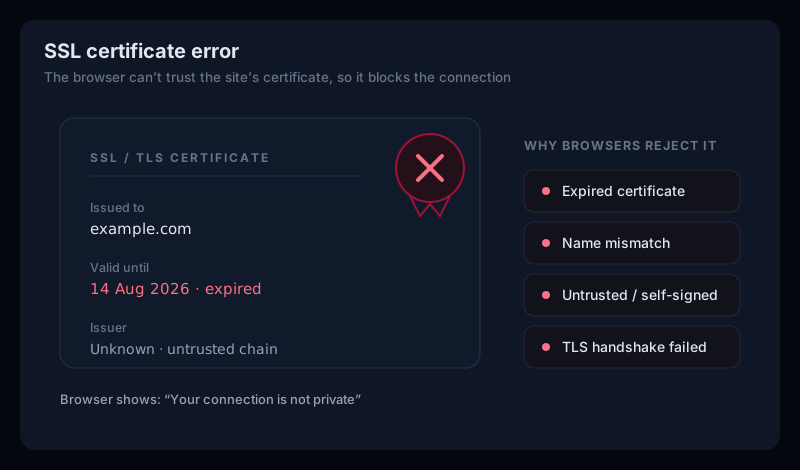
An SSL certificate errormeans your browser reached a site over HTTPS but couldn't trust its certificate — so it blocked the page instead of connecting insecurely. Behind the scary warning is one of a handful of specific problems: the certificate is expired, doesn't match the domain, isn't signed by a trusted authority, or the secure connection simply couldn't be established. This guide explains what each SSL error means and how to fix it, as a visitor or a site owner.
What is an SSL error?
Every HTTPS site presents a certificate that proves two things: that the connection is encrypted, and that the site is who it claims to be. So what is an SSL error? It's the browser saying it can't verify one of those — the certificate's trust chain, its validity dates, or the domain it's issued for doesn't check out. Rather than connect anyway, the browser shows a warning like “Your connection is not private” or reports that an SSL error has occurred.
The common SSL certificate errors
Almost every ssl certificate error is one of these four. Knowing which you have points straight at the fix:
- Expired certificate — every certificate has an expiry date, and once it passes, browsers reject it. A
ssl certificate expirederror is the most common, and the only fix is for the owner to renew. - Name mismatch — the certificate is valid but issued for a different domain (or missing the
www/ bare-domain variant). See NET::ERR_CERT_COMMON_NAME_INVALID for that case. - Untrusted or incomplete chain— the certificate is self-signed, or the server didn't send the intermediate certificates, so the browser can't trace it to a trusted root. See “unable to get local issuer certificate”.
- Handshake / protocol failure — the TLS handshake itself fails (
tls handshake failed), usually an outdated TLS version or no shared cipher. See ERR_SSL_PROTOCOL_ERROR.
If you're just visiting the site
Most SSL certificate errors are the site's to fix, but a couple have local causes worth ruling out:
- Check your device's date and time. A wrong clock makes valid certificates look expired or not-yet-valid. Set it to update automatically and reload.
- Try another browser or incognito.If it loads elsewhere, an extension, cache, or security app was the cause on your end — clear the site's data.
- Don't bypass the warning on sensitive sites. You canclick through most SSL warnings, but never on a page where you'll enter a password, payment, or personal details — the connection genuinely can't be verified.
A warning you can bypass is still a warning
If the site is yours — how to fix each
When your own site throws an ssl certificate error, start by seeing exactly what's wrong with the certificate, then fix that specific cause:
- Inspect the certificate first. Run your domain through our free SSL certificate checker — it shows the expiry date, issuer, whether the chain is complete, and which hostnames the cert covers, so you know which of the four problems you have.
- Renew an expired certificate.Issue a fresh one (a free Let's Encrypt cert works), install it, and automate renewal so it never lapses again — an expired cert is the most common and most avoidable SSL error.
- Send the full chain.Install the intermediate certificates alongside your own, or browsers on some devices won't be able to trust it (the “unable to get local issuer” case).
- Cover every hostname & enable modern TLS. Make sure the certificate covers both
wwwand the bare domain, and that the server offers TLS 1.2/1.3 — an old TLS version or a missing cipher causesthe ssl connection could not be establishedandssl connection errorin clients like curl and .NET.
SSL Certificate Errors FAQ
What does an SSL certificate error mean?
It means your browser reached the site over HTTPS but couldn't trust its certificate — because the certificate is expired, doesn't match the domain, isn't signed by a trusted authority, or the connection couldn't be secured. The browser blocks the page rather than risk an insecure connection.
How do I fix an expired SSL certificate?
There's no visitor-side fix for an expired certificate — the site owner has to renew it. If it's your site, issue a new certificate (a free one from Let's Encrypt works), install it with the full chain, and ideally automate renewal so it never lapses again.
Is it safe to bypass an SSL certificate error?
On a site where you enter anything sensitive — logins, payments, personal data — no. The warning means the connection can't be verified as secure. On a site you own and are just testing, clicking through is fine. When in doubt, don't proceed on any page that asks for information.
Why does "the SSL connection could not be established" happen?
That error (common in curl, PowerShell, and .NET) usually means the client and server can't agree on a TLS version or cipher — often the client only offers modern TLS while the server is stuck on an old one, or vice versa. Enabling TLS 1.2/1.3 on both ends resolves most cases.
Catch an expiring certificate before it errors out
The most common SSL certificate error — an expired cert — is also the most preventable. It doesn't break gradually; it works right up until the expiry date, then fails for every visitor at once, usually at the worst possible time.
Uptura's SSL monitoring watches your certificate around the clock — expiry, issuer, chain, and TLS version — and alerts you over email or Slack before it expires and the moment anything else with the certificate breaks, confirmed across checks to avoid false alarms. You can also run a one-off check right now with our free SSL certificate checker. Uptura is free during our public beta.